The maximum capacity for a Skills session is set when adding the session. See How to add a Skills session.
When a session has reached the set maximum number of attendees, any further Members booked will automatically be added to the session Waiting List.
These Members are displayed under the heading Waiting List at the bottom of the page.
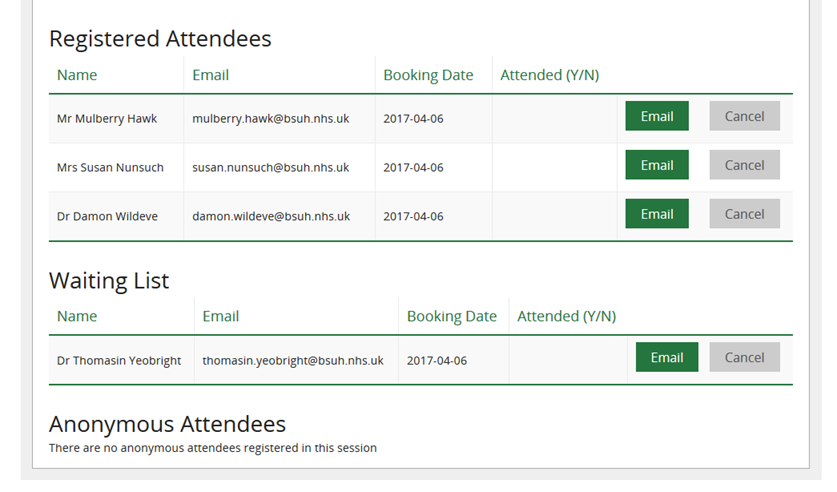
Email confirmations are sent to the Member and to the Session Leader.
Example Member email
Dear Mr Oak,
Unfortunately the session below is full so you have been added to the waiting list:
Accessing journals with OpenAthens
Access all our online resources through your NHS OpenAthens account.
01 March 2019, 11:00am - 12:00pm. The Library, Audrey Emerton Building
You will be notified if a place becomes available.
If you would like to see other dates available for this skills session and book a place, you can login into KnowledgeShare at www.knowledgeshare.nhs.uk using your NHS OpenAthens username and password
Members on the waiting list will be automatically booked on the session if:
a) a Member booked on a session cancels their booking and a place becomes available.
or
b) the session leader increases the capacity of the session.
Note: Members are moved from the waiting list onto the session in the order they were added to the waiting list. First on the waiting list will be first to be booked.
Email confirmations are sent to the Member and to the Session Leader.
Example Member email
Dear Mr Oak
You have been moved from the waiting list and booked on the following skills session:
Accessing journals with OpenAthens
Access all our online resources through your NHS OpenAthens account.
01 March 2019, 11:00am - 12:00pm. The Library, Audrey Emerton Building
You can see other skills sessions the library offers and book through KnowledgeShare at www.knowledgeshare.nhs.uk using your NHS OpenAthens username and password.
Was this article helpful?
That’s Great!
Thank you for your feedback
Sorry! We couldn't be helpful
Thank you for your feedback
Feedback sent
We appreciate your effort and will try to fix the article