An email with the subject line Welcome to KnowledgeShare is automatically sent to a new member when a library staff user creates a record (ie when Save is clicked on the Add New Member page).
Why do we send the Welcome email?
The email is part of GDPR compliance to ensure that all members are told how we are processing their information, and that they have easy access to their own data. The Welcome email cannot be disabled, but the wording can be customised for your own LKS if required. See How to create a custom LKS Welcome email template.
Who does the Welcome email appear to come from?
The Welcome to KnowledgeShare email appears to come from the staff member who has added the record (and clicked Save). If the Member replies to the Welcome message, the email will be routed to this staff member.
What does the Welcome email look like?
The default Welcome email wording is:
Subject line: Welcome to KnowledgeShare
Dear Gita,
As a member of [Library and Knowledge Service name], your details have been added to the KnowledgeShare system, which we use to provide and manage your access to library services.
Please log into KnowledgeShare to check your details:
- Click: [confirmation link] Please accept cookies to allow this process to work
- Enter the email address this email was sent to
- Log in with your NHS OpenAthens username and password
You will then be able to directly access KnowledgeShare using your NHS OpenAthens login. If you don't have an NHS OpenAthens username and password you can self-register at: https://openathens.nice.org.uk/
When you log in you will be asked if you are happy to share your contact information with other KnowledgeShare members. Doing this helps in the sharing of knowledge across healthcare, and connecting staff together across geographical boundaries.
We are committed to safeguarding your information. The information you supply will be used to contact you about services or resources you have requested from the Library and Knowledge Service. For further information on how we keep your information secure, and your rights to access it, read the full KnowledgeShare Privacy Policy.
With kind regards
Sender's First Name
Sender's Full Name
Sender's Job Title | Sender's Email Address
Sender's LKS | Sender's LKS Website
What happens when the Member clicks on the confirmation link?
When the Member clicks on [confirmation link] in the email, they will be taken to KnowledgeShare and asked to enter their email address. This email must match the email on their KnowledgeShare record for the registration to be successful.
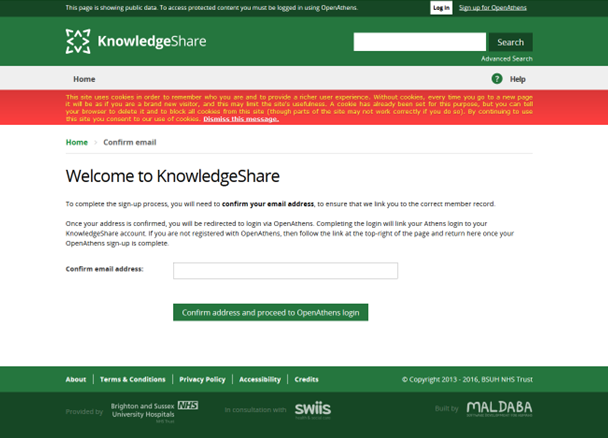
The Member is then given the option to enter their NHS OpenAthens username and password or find their institution.
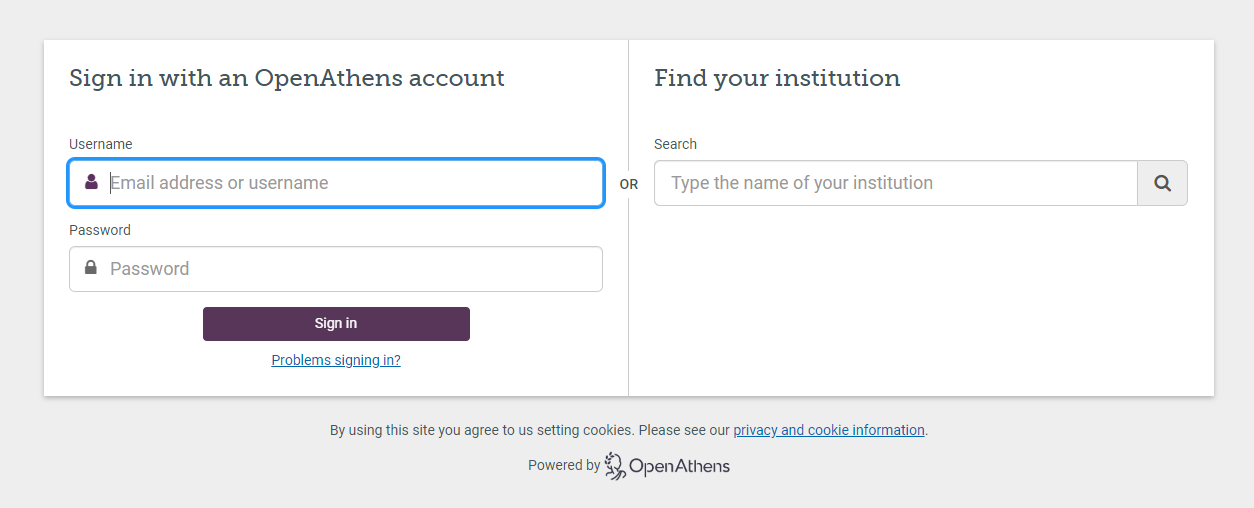
The Targeted ID of the member's NHS OpenAthens account will be associated with the member's KnowledgeShare record. They will now be able to log in directly to KnowledgeShare.
Manually triggering a Welcome email
The link in the Welcome email will expire if unused. A new email can be generated from the Member record.
Click on Send Welcome Email at the bottom of the Member details page.

Note: Members are not required to log in via the Welcome email in order to receive updates and other services provided through KnowledgeShare, but logging in to their profile gives them direct access to their services and settings.
Was this article helpful?
That’s Great!
Thank you for your feedback
Sorry! We couldn't be helpful
Thank you for your feedback
Feedback sent
We appreciate your effort and will try to fix the article